SolidWorks vs Fusion 360 for 3D Printing: Feature Comparison
SolidWorks and Fusion 360 are top CAD software for 3D printing, but which is best for you? This post compares their features, workflows, and benefits to help you decide.

Chalo! Let's talk about something that probably keeps half of us 3D printing enthusiasts up at night, especially when you're trying to make a living out of it like me here at Artopia Collections. It's the age-old, often heated, debate: SolidWorks vs. Fusion 360. Which one is better for 3D printing? And honestly, it’s not just about which one is 'better' in some theoretical, perfect world; it's about which one works better for *you*, for *your* projects, and for *your* wallet here in India. Because, let's be real, every rupee saved on software is another spool of good quality eSun PLA+ or some fancy carbon fibre composite, right?
I've been knee-deep in CAD software since I first got my hands on a clunky old Ender 3 (God bless that machine, it taught me everything!). Over the years, as my little business grew from printing custom keychains for friends to designing intricate architectural models and functional prototypes for local businesses, the software I use became a critical decision. It impacts everything – design speed, complexity, collaboration, even how well your parts come off the print bed. And believe me, nothing is more frustrating than spending hours designing something, only for it to have weird geometry issues when you export it for your Creality K1 Max.
SolidWorks: The OG, The Industry Titan
Let's start with SolidWorks. This software, for me, is like that reliable old friend who's always been there, always gets the job done, but maybe costs a bit more to hang out with. It's a behemoth, an industry standard, especially in mechanical engineering and product design. When I started, I gravitated towards it because, well, that's what everyone in the "serious" engineering world seemed to be using. And for good reason, too.
What I love about SolidWorks for 3D Printing:
- Unmatched Parametric Modeling: This is where SolidWorks shines. Its parametric modeling capabilities are simply top-tier. You sketch, you constrain, you extrude, you cut, and every single dimension, every single feature, is linked. Need to change a hole diameter from 5mm to 6mm? Boom, change one number, and the entire model updates intelligently. For precision parts, jigs, fixtures, or anything that needs to be dimensionally accurate and easily modifiable, it's a dream. For a business like mine that often iterates on designs, this is incredibly powerful.
- Robust Assemblies: Building complex assemblies? SolidWorks handles it with grace. Mating components, creating exploded views, checking for interferences – it’s all incredibly robust. When I'm designing something like a gearbox casing or a multi-part enclosure that needs tight tolerances, SolidWorks just doesn't break a sweat.
- Advanced Surfacing and Features: While it might not be a dedicated artistic sculpting tool, SolidWorks has powerful surfacing tools. For adding smooth, organic transitions or complex curves to functional parts, it’s excellent. Features like "Shell," "Loft," "Sweep" are incredibly powerful for generating complex geometries that print beautifully.
- Stability: In my experience, SolidWorks is incredibly stable. Crashes are rare, and auto-save is usually pretty reliable. When you’re on a deadline, that peace of mind is priceless.
But here's the kicker, the big, hairy elephant in the room: the cost. SolidWorks is expensive. Really expensive. For a full commercial license of SolidWorks Standard, you're looking at something in the range of ₹4 to ₹6 lakhs for a perpetual license, plus an annual maintenance subscription that can run ₹80,000 to ₹1.2 lakhs. That's a huge upfront investment for a small business like Artopia. Now, they do have SolidWorks for Makers, which is much more affordable at around $99 USD (roughly ₹8,300) a year, and student versions are also available. But if you're doing commercial work and want the full suite without any usage restrictions, the price point is definitely a barrier here in India, especially when you're just starting out.
And let's not forget the system requirements. You need a pretty beefy PC to run SolidWorks smoothly, especially with complex assemblies. My old laptop used to groan and wheeze trying to handle some of my more intricate designs. So that's another investment to consider.
Fusion 360: The Agile Challenger, The Cloud-Native Maverick

Then we have Fusion 360. Oh, Fusion. It burst onto the scene like a breath of fresh air, especially for hobbyists and smaller businesses. It's from Autodesk, the same folks who gave us AutoCAD, but Fusion is a whole different beast. It’s cloud-based, integrated, and incredibly versatile.
What I absolutely dig about Fusion 360 for 3D Printing:
- Accessibility and Price: This is the big one. Fusion 360 offers a free personal use license (with some limitations, of course, like fewer simultaneous active documents and less access to advanced CAM features). For a commercial license, it's roughly ₹25,000 to ₹30,000 per year. Compared to SolidWorks, that's incredibly affordable and accessible, making it a fantastic entry point for anyone serious about 3D design without breaking the bank. For a small business, that annual fee is manageable and predictable.
- Integrated Workflow: Fusion isn't just a CAD tool; it's a CAD/CAM/CAE powerhouse. You can design, simulate (FEA), sculpt (T-Splines!), generate toolpaths for CNC machining (CAM), and render – all within the same environment. For 3D printing, having that integrated simulation can be super helpful to check for weak points before you even print.
- Direct and Parametric Modeling: Fusion offers both! You can do traditional parametric modeling, but it also allows for direct modeling, which means you can push, pull, and manipulate faces and edges directly, almost like digital clay. This is brilliant for quick edits or for working with imported meshes that might not have a clean feature history.
- Sculpting (T-Splines): This is a game-changer for organic shapes. If I'm designing something artistic, like a decorative vase (check out some of our designs over at Artopia Collections!) or a figurine, Fusion's T-Spline environment is absolutely fantastic. It allows for freeform modeling in a way that SolidWorks simply can't match without external plugins. You can create smooth, flowing geometries that are tough to achieve with traditional solid modeling.
- Generative Design: This is cutting-edge stuff. You define your design constraints, materials, and loads, and Fusion's generative design tools will create optimized, often organic-looking designs for you. While sometimes overkill for simpler 3D prints, it’s incredible for creating lightweight, strong parts for specific applications. Think aerospace or medical implants – that kind of thing.
- Cloud Collaboration: Since it's cloud-based, collaboration is pretty seamless. You can share designs, get feedback, and work with others easily.
Now, it's not all sunshine and rainbows. Fusion 360, being cloud-based, sometimes suffers from performance issues if your internet connection isn't great, which can be a bit of a hiccup here in India, depending on your location. And honestly, while it's stable *most* of the time, I've had more crashes or unexpected behaviors with Fusion than with SolidWorks over the years. Plus, while its parametric modeling is good, it's not quite as robust or "bulletproof" as SolidWorks for extremely complex assemblies with hundreds of parts. Sometimes, it feels a bit slower on certain operations compared to SolidWorks running on a high-end local machine.
The thing is, the free personal license, while amazing, has limitations. For commercial use, you'll need the paid subscription. And those limitations can stack up if you're trying to push the boundaries with complex projects or need specific CAM features.
Feature Comparison for 3D Printing: Head-to-Head
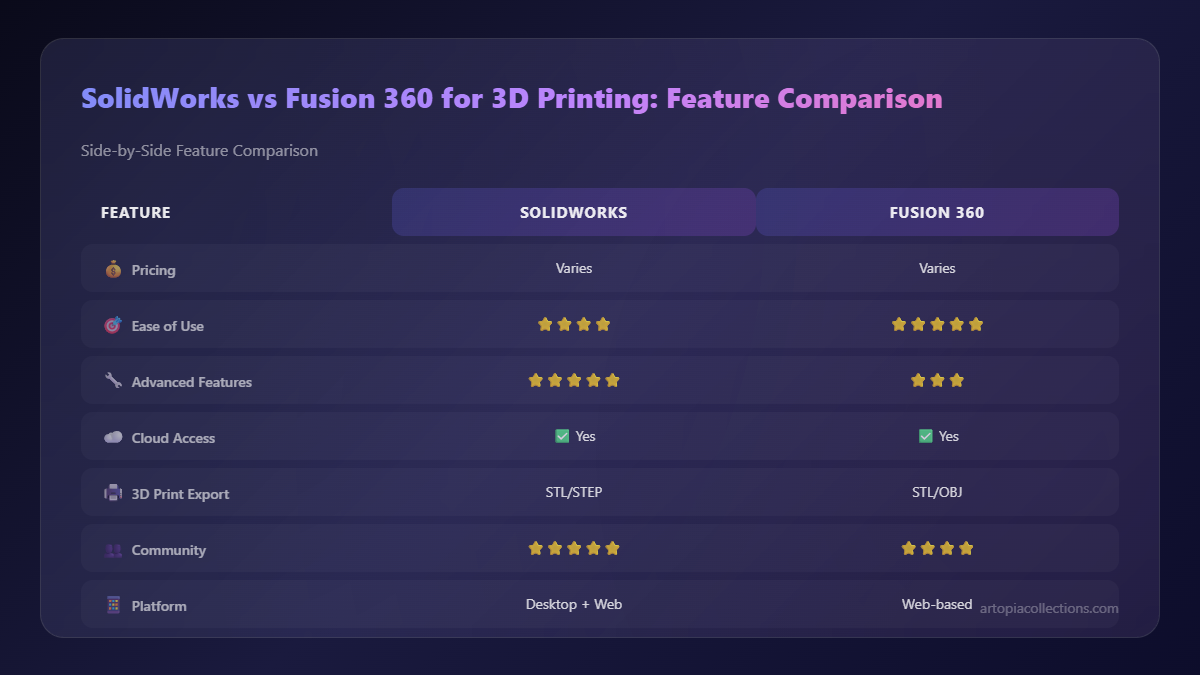
Let's get down to the brass tacks for what really matters when you're sending a design to your 3D printer.
Modeling Workflow & Precision
SolidWorks excels in precise, dimension-driven parametric modeling. If you need a part that absolutely, positively has to be 100mm x 50mm x 20mm with a 6.5mm bore, SolidWorks makes that dead simple and ensures it stays that way through revisions. Fusion 360 does parametric modeling very well too, but it feels a bit more fluid and less rigid, which can be a double-edged sword. For mechanical parts, I still lean towards SolidWorks for that absolute, no-questions-asked precision.
Organic Shapes & Aesthetics
Hands down, Fusion 360 wins here with its T-Spline sculpting environment. If you're designing figurines, artistic pieces, ergonomic grips, or anything that requires flowing, organic contours, Fusion is the way to go. SolidWorks can *do* some surfacing, but it's a more traditional, mathematical approach, and creating truly freeform shapes is a much more laborious process.
Assemblies & Multi-Part Designs
Both are great, but SolidWorks generally handles massive, complex assemblies with more stability and speed. For smaller to medium-sized assemblies, Fusion 360 is perfectly capable and sometimes even quicker to get started thanks to its component-based workflow. For my business, when I'm designing something like a modular storage system with many interlocking parts, SolidWorks gives me more confidence, especially when dealing with motion studies and interference detection.
Generative Design & Optimization
Fusion 360 is the clear winner. Its generative design capabilities are integrated and powerful. While it might not be a daily driver for every 3D print, for advanced optimization of parts (like creating lightweight brackets or strong structural components), it’s an incredible tool. SolidWorks has some optimization tools through its simulation add-ins, but it’s not as integrated or user-friendly as Fusion's generative design for creating novel geometries.
Slicing & Exporting for 3D Printing
Both SolidWorks and Fusion 360 can export standard STL files (and other mesh formats like OBJ) flawlessly. This is the bread and butter for sending your models to slicers like PrusaSlicer, Cura, or Bambu Studio. Neither software has built-in slicing capabilities that are on par with dedicated slicers, and honestly, you wouldn't want them to. Dedicated slicers do that job best. The export process is straightforward in both.
Learning Curve & Community
Fusion 360 generally has a gentler learning curve for newcomers, especially those without prior CAD experience. Its interface is relatively intuitive, and there are tons of tutorials online, many of them free, thanks to its popularity among hobbyists. SolidWorks, while also having a massive community and countless tutorials, can feel a bit more daunting for a beginner due to its depth and the sheer number of features. But once you get the hang of SolidWorks, its logic becomes second nature.
My Business Perspective: Artopia Collections
So, which one do I, Vidyut, from Artopia Collections, actually use day-to-day? Here's the honest truth: I use both. It's not a matter of one being definitively "better"; it's about using the right tool for the right job.
For custom enclosures, precise jigs for my workshop, replacement parts for machinery, or anything that demands absolute dimensional accuracy and easy revision control, I fire up SolidWorks. For example, if a client needs a custom mount for a sensor that has to fit perfectly into an existing assembly, SolidWorks is my go-to. I can design it, simulate the fit, and be confident that my Bambu Lab P1S will print it exactly as intended, often with Overture PETG for strength.
But when a client comes to me asking for a unique, aesthetically pleasing decorative item, an ergonomic grip for a tool, or a custom miniature, Fusion 360 is what I instinctively open. Its T-Spline environment just makes it so much faster and more enjoyable to sculpt those flowing, organic shapes. And for quick concept sketches or iterations where precision isn't the absolute top priority, Fusion's direct modeling capabilities are a lifesaver. Plus, its integrated rendering engine is pretty good for showing clients what the final product will look like.
I also use Fusion extensively for preparing models that might come from other sources, like scanned objects, where I need to clean up meshes or make quick modifications. The cloud aspect sometimes makes sharing project files with a remote collaborator (a friend who helps me with some rendering work) much smoother, too.
The Verdict: Who Should Use What?
Look, if you're a hobbyist just starting out, or a student, or even a small business with limited budget here in India, Fusion 360 is probably your best bet to start. The free personal license gives you incredible power to learn and create, and the jump to a commercial license is financially digestible. It's versatile, integrated, and handles both functional and artistic designs beautifully. It's perfect for printing anything from cosplay props to functional prototypes on your Anycubic Kobra 2 Neo with some locally sourced Okhai filament.
However, if you're coming from a traditional engineering background, or your business primarily deals with high-precision mechanical components, complex assemblies, jigs, fixtures, or anything that absolutely demands robust parametric control and industry-standard documentation, then SolidWorks is worth the investment, if you can swing it. The learning curve is steeper, the cost is significantly higher, and the hardware requirements are more demanding, but its capabilities for deep-dive engineering are still unparalleled. For the absolute critical, no-fail mechanical parts, SolidWorks still reigns supreme in my workshop.
Ultimately, the best software is the one that allows *you* to bring *your* ideas to life efficiently and effectively. Both SolidWorks and Fusion 360 are phenomenal tools, each with its own strengths and weaknesses. Don't let anyone tell you one is universally better. Experiment, try them out (SolidWorks has free trials too!), and see which one clicks with your workflow and your budget. Happy designing, my friends, and may your prints always stick to the bed!


